Inspection Request Form (IRF) – 2

Estimated reading time: 4 minutes

In any construction, infrastructure, or industrial project, formalizing the readiness of work for inspection is a pivotal milestone. The Inspection Request Form (IRF) is not just administrative — it underpins accountability, quality control, and the seamless handover of responsibility. This article explores why it matters, how to implement it effectively, and best practices you should embed in your workflows.

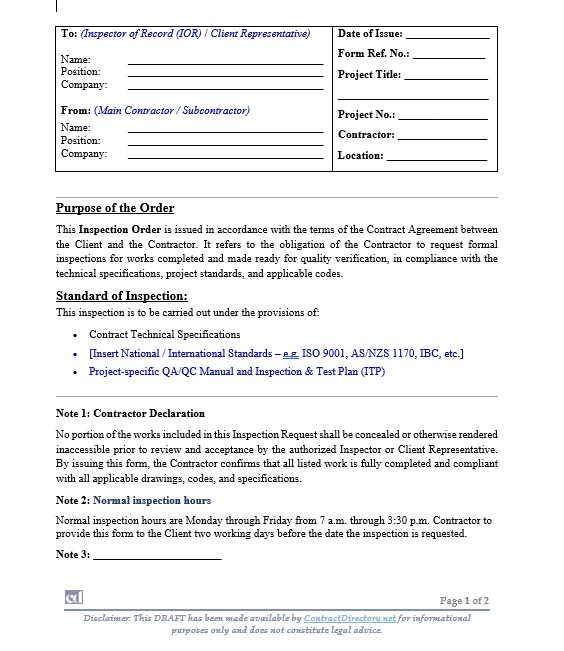
Inspection Request

1. The purpose of the IRF

When a contractor declares a portion of work ready for inspection, the declaration triggers a range of downstream processes, consultant review, official sign-off, payment milestones, release of subsequent works, and potentially regulatory endorsement.

Without a documented request form, you risk ambiguity: what exactly was completed, by whom, when, and against what standard. Standard templates help ensure consistent data capture (project name, location, scope, attachments) and provide traceability. For example, template libraries show forms with structured fields for project info, request number, inspection type, and attachments.

2. When to deploy the form

Use the IRF after a discrete scope of work is complete and before final inspection scheduling. Typical use cases include:

  • Completion of structural works within a zone/floor/axis
  • MEP systems ready for commissioning
  • Architectural finishes ready for review
    The contractor submits the form, appends supporting documents (shop drawings, test reports, photos), and certifies compliance with standards. The consultant or engineer then uses the form to log review, outcome, and next steps. Without this step, you may find rework, delays, or payment disputes.

3. The fields that matter

Based on common templates:

  • Project/job reference: ensures elements link back to the contract and payment.
  • Inspection request number/date: audit trail, version control.
  • Inspection type & scope: specifies what is being inspected (structural, MEP, etc.).
  • Location / zone / floor / axis: precise identification prevents confusion.
  • Contractor certification: legally confirms work was done to spec.
  • Attachments: drawings, test reports, etc., give context and evidence.
  • Consultant outcome section: records accepted, accepted with remarks, or rejected.
    Each of these supports clarity, accountability, and documentation — all vital when disputes or claims arise.

4. Best practices for implementation

  • Use a standardised template across the project to avoid form fragmentation. Templates available online offer ready formats in Word, PDF, and Excel.
  • Maintain version control with revision numbers and submission dates.
  • Require contractor certification before the form is accepted — this allocates responsibility.
  • Attach relevant supporting documents (shop drawings, tests, photos) to the form. This avoids back-and-forth and speeds inspection.
  • Ensure consultant/engineer response is logged on the form (approved/approved as noted/revise & resubmit / not ready). This provides immediate feedback and keeps work moving or on hold appropriately.
  • Store completed forms in a searchable archive (digital or physical) for audits, claims, and handover.
  • Use the IRF as a control tool: links inspection readiness to payments, release of next works, and certification.

5. Common pitfalls to avoid

  • Submitting a form without attaching the required documents leads to delays in review.
  • Vague scope or incomplete location details result in mis-inspection or rework.
  • No contractor certification leaves accountability blank.
  • No outcome recorded by the consultant leaves the inspection status uncertain.
  • A poor version control or numbering system creates confusion in high-volume projects.

Why this matters for your consulting practice

If you’re advising clients on project management or contract administration (which aligns with your consulting goal in construction), emphasising a robust IRF process adds value. It shows you have systems-oriented, document-driven controls, not just technical oversight. It builds confidence in your ability to manage the finishes stage, inspections, and handover workflows. Given your ambition to move into project management and master the finishing selection stage, increasing your command of such forms and their role in contract workflows bolsters your professional profile.

Conclusion

The Inspection Request Form may appear routine — but its role is far from trivial. It formalises readiness, clarifies responsibility, logs inspection outcomes, and links contract delivery to payment and certification.

By introducing a standardised template, enforcing required fields, attaching supporting documentation, and ensuring clear consultant responses, you transform inspection readiness from a loose checkpoint into a reliable control mechanism. In the broader narrative of your consulting and project-management trajectory, mastering such forms positions you not just as a technical advisor but as a process-driven professional capable of guiding complex construction workflows to consistent, auditable completion.


Check out more pages of our website for related content:

Access the Full Contract Directory Index

You can browse the complete alphabetical list of all commercial, financial, and project-based contract templates by visiting our A–Z Contract Index.


References

  1. 1. ASTM International – Construction Inspection and Quality Control Standards – This source includes globally recognised standards for inspection procedures, documentation, and readiness verification in construction and industrial projects.

    2. U.S. Army Corps of Engineers (USACE)Quality Control System Requirements: Three-Phase Control and Inspection Procedures – USACE provides one of the most respected inspection-readiness frameworks in global construction, including procedures for Inspection Requests (IRFs).

    3. Institution of Civil Engineers (ICE)Guidance on Site Inspection, Quality Management, and Construction Verification – ICE offers detailed professional guidance on inspection readiness, verification processes, and structured quality workflows in civil engineering projects.

has been added to your cart!

have been added to your cart!

This pre-draft of :Inspection Request (IRF)” is prepared in 3 pages.

Word (.doc)

This pre-draft of :Inspection Request (IRF)” is prepared in 3 pages.

The templates mostly include some words, phrases, tables, or paragraphs that should be replaced with specific information related to your case. For example:

Blue italicized text enclosed in square brackets [text] provides instructions to the document author or describes the intent, assumptions, and context for content included in this document.

Word(s) or expressions marked in blue in the text without brackets indicate a field that needs to be modified depending on your specific case or project or can still be used as suggested.

Text and tables in black are provided as examples of wording and formats that may be used or modified as appropriate to a specific case or project. These are offered only as suggestions to assist in developing documents; they are not mandatory formats.

Note: Before using your final prepared documents DO NOT FORGET to delete the Disclaimer in the footage.

Enterprise Plan

Best Choice For large companies and project owners with complex document workflows.

  • Unlimited download for one year
  • Real-time download
  • Access to all documents
  • 12 months of Email support